Thai alphabet · iPhone · offline
GlyphTH Learn Thai script: listen, write, recognise
The iPhone app for the Thai alphabet.
GlyphTH teaches you the Thai script in small lessons: 44 consonants, 30 vowels and 10 digits. You hear every character, write it with your finger and learn to tell it apart from similar ones.
Coming soon to the App Store
- 44 consonants
- 30 vowels
- 10 Thai digits
- 4 exercises per letter
In short
What is GlyphTH?
GlyphTH is an iPhone app for adults who want to read and write the Thai script. You learn 44 consonants, 30 vowels and the 10 Thai digits step by step: first the mid class, then high and low class. Every letter comes with a memory word, a picture and natural pronunciation. Everything works offline, with no account and no ads.
Why GlyphTH
A learning path for adults
A clear order, short units and feedback that does not sugar-coat anything.
consonants
Thai consonants are named with a word: ก ไก่ is “ko kài”, the chicken. GlyphTH shows this word for every character – background in the guide Consonant names.
exercises per letter
In every lesson you hear, write and recognise the same character. The app remembers your mistakes and asks about them again later.
ads, subscriptions, tracking
GlyphTH needs no internet connection and no sign-up. There are no ads and your behaviour is not analysed.
How you learn
4 exercises per letter
In every lesson you hear, write and recognise the same character. The app remembers your mistakes and asks about them again later.
- 01
Listen & see
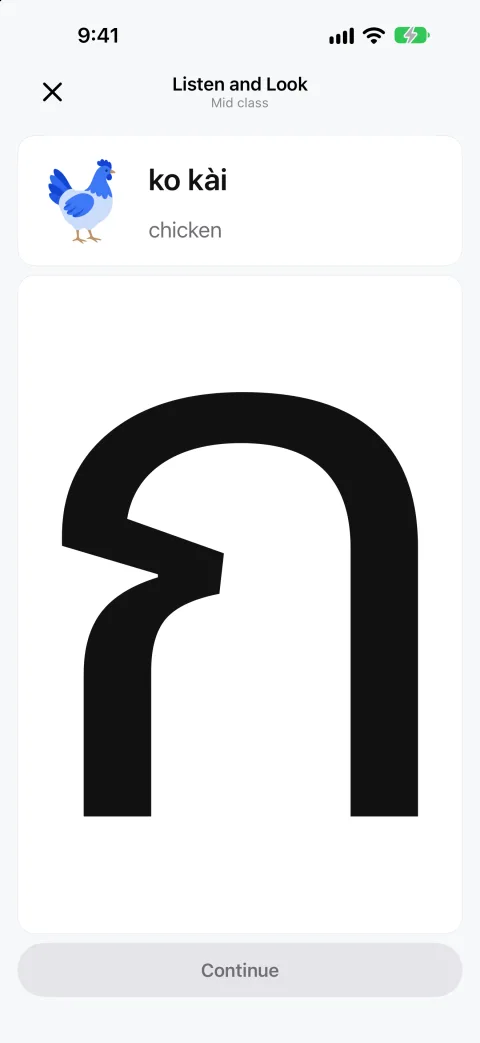
You see the character with its picture and memory word and hear how it is pronounced, for example ก ไก่ – “ko kài”, chicken.
- 02
Trace
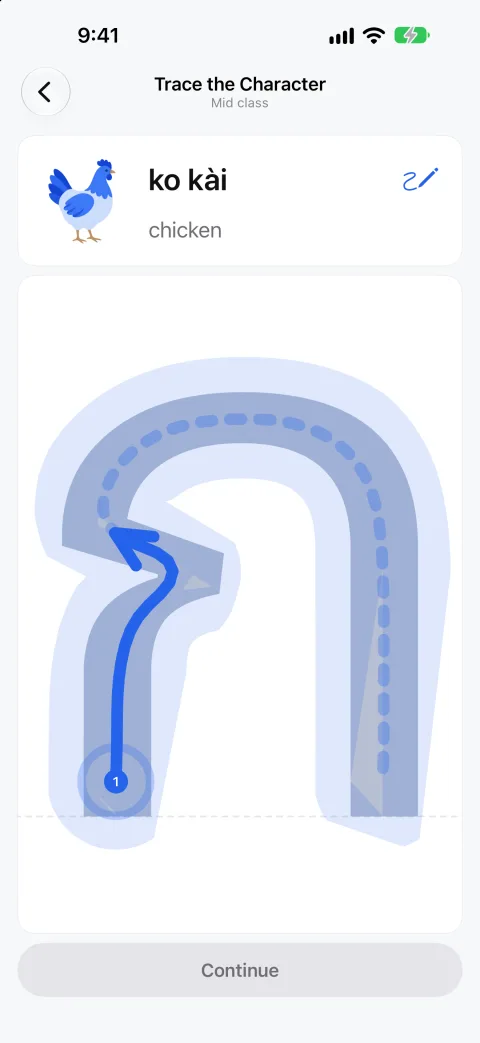
You follow the template with your finger. Starting point and direction are marked.
- 03
Recognise
Nine characters to choose from, one is the right one – the most similar ones are among them.
- 04
Write freely
Finally you write the character without a template.
App preview
This is what GlyphTH looks like

Tone DNA
Mid, high, low
Every Thai consonant belongs to one of three classes, and the class helps decide the tone of a syllable. GlyphTH therefore teaches the classes in turn and marks every character with its class. More in the guide Consonant classes.
This is where you begin: 9 characters with the simplest tone rules.
Many aspirated and hissing sounds. Without a tone mark the tone here is often rising.
Most characters belong here. Many of their sounds also exist in the high class.
Look-alike training
Characters that look alike
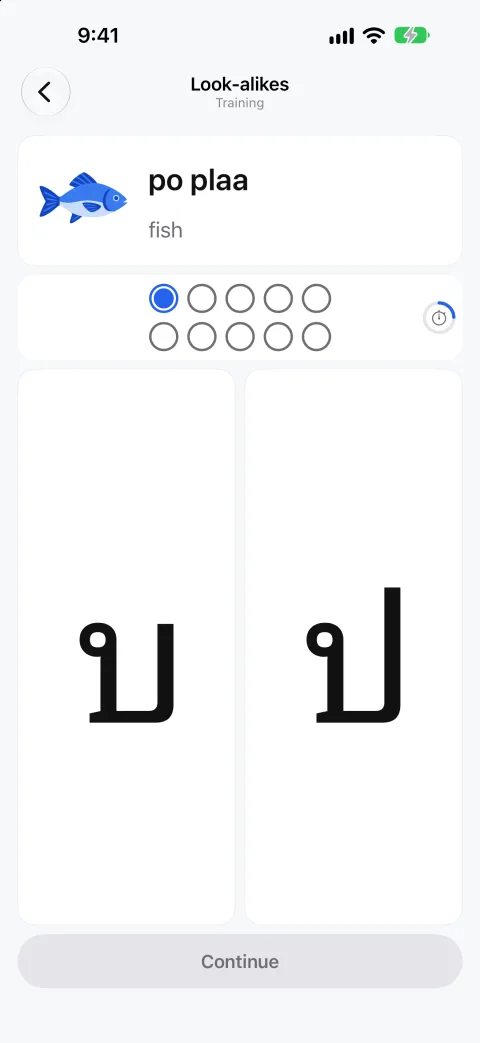
Pairs such as บ and ป or ด and ต differ in a single detail. GlyphTH shows them next to each other and lets you tap the spot where they differ. The most important pairs: Look-alike letters.
What’s inside
Features
Memory words
Thai consonants are named with a word: ก ไก่ is “ko kài”, the chicken. GlyphTH shows this word for every character – background in the guide Consonant names.
Illustrations
Each of the 44 memory words comes with its own picture, so character and meaning stay in mind together.
Female and male voice
The pronunciation is recorded with two voices. You pick the one you hear in the settings.
One transcription
The Latin spelling is the same throughout the app and shows tone and vowel length. More on this: Thai transcription.
Checked on the device
The iPhone itself works out whether your stroke follows the shape. The result is a guide, not a grade.
Reviews
The app collects what you mixed up and brings it back in separate lessons.
Look it up
The reference lists all consonants and vowels with class, pronunciation and similar characters.
No network, no account
GlyphTH needs no internet connection and no sign-up. There are no ads and your behaviour is not analysed.
GlyphTH Pro
Start for free, unlock once
You buy the Pro version once in the App Store. There is no subscription, and Family Sharing is supported.
| Scope | Free | GlyphTH Pro |
|---|---|---|
| Consonants | 9 (mid class) | all 44 |
| Vowels | – | 30 |
| Thai digits | – | 10 |
| Exercises | all 4 | all 4 |
| Look-alike training | included | every look-alike pair |
| Review lessons | included | for every character you unlock |
| Ads, subscription, account | none | none |
Free for good: all 9 characters of the mid class, with every exercise, the training for similar characters and the reviews. Pro: one-time in-app purchase.
Guides
Guides to the Thai script
Short texts on the questions that come up first when learning.
Learn the Thai alphabet
Which characters there are and in which order GlyphTH teaches them.
Learn more →Consonant classes
Which characters count as mid, high and low class and what the division is for.
Learn more →Thai tones
How class, syllable type and tone mark together give the tone.
Learn more →Look-alike letters
The most important pairs and the detail that gives each one away.
Learn more →Thai vowels
Positions, short and long vowels and a good place to start.
Learn more →Writing Thai letters
Where to start, how the stroke runs and how GlyphTH checks your writing.
Learn more →Consonant names
How the names are formed and what they are needed for.
Learn more →Thai transcription
Why the same word is written “Khao” in one place and “khâo” in another.
Learn more →In-depth guides and the whole alphabet to listen to are on glyphth.de – the website for GlyphTH.
Questions
Common questions
Is GlyphTH free?
Yes, to start with: you learn all 9 consonants of the mid class without paying, with every exercise. If you want to go on, you unlock the Pro version once through an in-app purchase – there is no subscription.
Do I need to know any Thai already?
No. The app assumes nothing and starts with the first character, ก. Learn more →
How many characters does the Thai script have?
44 consonants, of which ฃ and ฅ are no longer in use. On top of that come the vowel signs, four tone marks and digits of its own. Learn more →
What are consonant classes for?
The class of a consonant – mid, high or low – determines, together with vowel length, syllable ending and tone mark, the tone in which a syllable is spoken. Learn more →
Does the app teach tones as well?
The basics, yes. As soon as you can read syllables you learn three tone rules, each with an audio example. The remaining cases and the tone marks are covered in the guide. Learn more →
How do I practise writing?
With your finger on the screen. First you follow a template with starting point and direction, later you write without help. The evaluation runs directly on the iPhone. Learn more →
Do I need internet?
No. All recordings are part of the app. A connection is only needed to buy the Pro version in the App Store.
What happens to my data?
The app collects none. You need no account, nothing is analysed or sent to a server, and your progress is stored only on your iPhone.
How does the app write Thai in Latin letters?
With one fixed transcription that shows tone and vowel length, such as “khǒ khài”. It is used the same way everywhere in the app. Learn more →
Why do so many characters look alike?
Quite a few consonants go back to the same basic shape and differ only by an addition. You practise such pairs specifically in GlyphTH. Learn more →
Are the Thai digits included?
Yes, in the Pro version: the 10 digits from ๐ to ๙, each with its number word and pronunciation.
And the vowels?
They are part of the Pro version too. Every vowel is shown with its position on the consonant and an example word. Learn more →
Which devices and languages does GlyphTH support?
iPhone with iOS 18 or later. You can use the interface in English and German.
Do I keep my purchase on a new iPhone?
Yes. It is tied to your Apple ID. Tap “Restore purchases” in the app’s settings.
Start with the first character
You learn the mid class for free, and a lesson takes only a few minutes.
Coming soon to the App Store